Sunday, June 2, 2019

Windows 7, 8 සහ 10 64 bit Edition වල C Drive එකේ නැතුව අනෙකුත් Partition වල Msdia80.dll කියන File එක තිබුණොත් ඒක අදාළ ස්ථානයට Move කරල Register කරන හැටි

සාමාන්‍යයෙන් 64bit OS තියෙන PC එකක Microsoft Visual C++ 2005 Redistributable Package එක Install කරා ම මෙම File එක තිබිය යුත්තේ boot drive එකේ root folder එකේ එනම් C:\Program Files\Common Files\Microsoft Shared\VC\msdia80.dll. නමුත් සමහර වෙලාවට මේක වෙනත් Partition වලට යන්න පුළුවන්. එහෙම උනොත් පහත Link එකෙන් Microsoft Visual C++ 2005 Service Pack 1 Redistributable Package ATL Security Update එක Download කරල Install කරන්න ඕන.


එහෙම නැත්නම් මෙම File එක අදාළ තැනට Move කරලා, Command Prompt එකේ Run as administrator ගිහිල්ලා පහත පරිදි Type කරලා Enter කරන්න ඕන.

regsvr32 "C:\Program Files\Common Files\Microsoft Shared\VC\msdia80.dll"

උපුටා ගැනීම

Saturday, July 21, 2018

Resolve Photoshop Error - Could not complete your request because there is not enough memory


Photoshop වල Image එකක් Save කරද්දි මේ වගේ Error එකක් ආවොත් පහත ආකාරයට Registry Edit එකකින් නිවැරදි කර ගන්න පුළුවන්.

Saturday, October 14, 2017

Windows Keyboard Shortcuts

වැඩක් කරන ගමන් එක පාරට ම Desktop එක්ට යන්න  Win+D
විවෘත වෙලා තියෙන ඔක්කොම Window ටික Minimize කරන්න Win+M
නැවත එම Window ටික Maximize කරන්න  Win+Shift+M
Open වෙලා තියෙන Window අතර මාරු වෙන්න  ALT+Tab
My Computer / Computer Open කර ගන්න  Win+E
Search එක Open කර ගන්න  Win+F
Run Dialog Box එක Open කර ගන්න Win+R
ඉක්මනින් Account එක Lock කරන්න  Win+L
Browser එකේ Tab අතර මාරු වෙන්න  Ctrl+Tab
අලුතින් Browser Tab එකක් Open කරන්න  Ctrl+T

USB On-The-Go (USB OTG)

Smartphones හෝ Tablet වලට කෙලින් ම USB Flash Drive, Digital Camera, Mouse සහ Keyboard සම්බන්ධ කිරීම මඟින් එම උපාංග Smartphones හෝ Tablet එක මගින් භාවිතා කළ හැකි ය. (https://en.wikipedia.org/wiki/USB_On-The-Go)

Saturday, September 16, 2017

Formula 1

F1 1996 (Formula 1)

F1 1997 (Formula 1 97, Formula 1 Championship Edition)

Monday, May 22, 2017

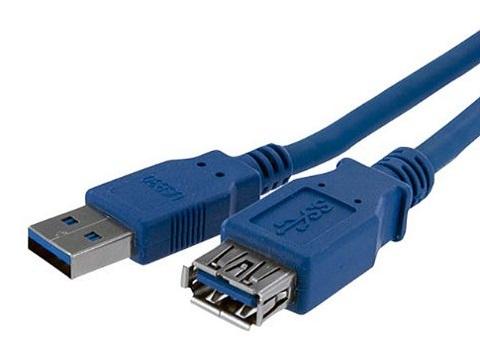
USB (Universal Serial Bus)

USB Type A

USB Type A (Male & Female)
USB Type A Superspeed (Male & Female)

HDMI සහ DVI

HDMI (High-Definition Multimedia Interface)


Thursday, January 12, 2017

Chrome වල Open කරපු සියලු ම Tab වල URL Copy කර ගන්නා හැටි

පහතින් දැක්වෙන ආකාරයට විවෘත කර ඇති සියලු ම Tabs Bookmark විදියට වෙන ම Folder එකක Save කර ගත හැකි ය.

1. ඒ සඳහා පළමු ව Ctrl+Shift+d Press කරන්න.

2. ඉන් පසු Bookmark කළ යුතු Tab සඳහා නමක් ලබා දී Save කරන්න.

3. Ctrl+Shift+O Press කර Bookmark Manager එක ලබා ගන්න.

4. එහි Save කරන ලද Folder එක Select කරන්න.

5. Ctrl+a Press කිරීමෙන් එහි ඇති සියලු ම url Select කර Ctrl+c මගින් ඒවා Copy කර ගත හැකි ය.


මීට අමතර ව Chrome සඳහා පහත Extension ද භාවිතා කළ හැකි ය.

Get opened tabs URLs


Tuesday, January 3, 2017

Download Torrents without Torrent Client @ Full Speed

1. You have to create a free Seedr account. Use this link to get additional 500mb space for you and me. 

Seedr
(You initially get 2.5GB Free and It can be Upgrade through Earn Free Space link show below.)


2. Then you can download torrent using IDM or through your browser at maximum speed of your connection.

3. Seedr help me to download torrents when SLT gives free data on 1st of January 2017. (They Blocked torrents that day).

Sunday, October 9, 2016

Adobe Photoshop CC වල High CPU Usage එක නැති කරන හැටි


Adobe CC Applications install කරල තියෙන කොට CEPHtmlEngine Helper process එකේ CPU usage එක වැඩි නම් පහත සඳහන් ක්‍රමය මගින් එය ඉවත් කළ හැකි ය.

1. %USERPROFILE%\AppData\Local\Adobe\Creative Cloud Libraries\ වල Logs Folder එක නොමැති නම් Logs යනුවෙන් Folder එකක් Create කරන්න. 

2. පහත සඳහන් Folder වල ඇති දේ වෙනත් ස්ථානයකට copy කර (as a backup) සපයා ඇති link එකේ ඇති සියලු දේ එම Folder එක තුළට කොපි කර Overwrite කරන්න.

Wednesday, August 24, 2016

Internet නොමැතිව .Net Framework 3.5, Windows 10 වල install කරන හැටි

Windows 10 DVD එක DVD Drive එක තුළට ඇතුළ කරන්න. (Pen Drive එකද භාවිතා කළ හැකි ය.) නැතහොත් Windows 10 iso එක Double Click කරන්න. ඉන් පසු එහි Drive Letter එක මතක තබා ගන්න.


Windows 10 Slideshow Time එක අඩු කරන හැටි

Search Box එකෙහි cmd ලෙස Type කරන්න. එවිට එන Command Prompt එක Right Click කර Run as administrator Click කරන්න. එහි  control /name Microsoft.Personalization /page pageWallpaper යන්න Type කර Enter කරන්න.


Sunday, June 26, 2016

Windows 10 Automatic Updates නවත්වන හැටි

Mobile / Cellular Connection එකක දී එය Windows 10 විසින් Metered Connection එකක් ලෙස ගෙන Updates Automatically Download නොකරයි.

Wi-Fi Connection එකක දී එය පහත පරිදි Metered Connection එකක් බවට පත් කළ හැකි ය. 

Settings ======> Network & Internet, Wi-Fi ======> Advanced options ======> list of Wi-Fi networks. Enable the Set as metered connection. (මෙය තෝරා ගත් Wi-Fi Connection එක සඳහා පමණක් අදාළ වේ. එක් එක් Connection එක සඳහා වෙන වෙන ම මෙය සකස් කළ යුතු ය.)


Tom Clancy's The Division

Tom Clancy's The Division (2016)


Sunday, September 6, 2015